Web Application Development Basics
Note
There is no code installation or command execution required in this section.
In this section, we discuss Web Applications (Web app or WebApp). This section exposes you to the suite of software components in a typical Web application.
A Web app is software that runs on a browser. It appears to user as a website or Web page. The browser permits user interaction with the software. There is generally a backend server providing the necessary functionalities or services. The backend server usually provides database support. In our case, the backend server is a blockchain.
WebApps are developed using Web technologies like HTML, JavaScript, and CSS. WebApps are platform-independent, which means the same app runs on Apple Mac OS, Microsoft Windows, Ubuntu, Android, or iOS. These applications run on Internet browsers like Google Chrome, Firefox, Microsoft Edge, Brave Browser, and more. They are used by a single or a group of users.
Websites vs Web Applications
In websites, users view information provided by a company or an organization. With a WebApp, users are able to manipulate data; i.e., create, read, update and delete data (CRUD operations) of an organization. As data is stored in the organization’s database located in company premises, a WebApp connects users to the organization’s database via the Internet.
Generally, we do not allow users to directly manipulate the organization’s database. There is a well defined set of business processes that are created to manipulate data. Users are constrained to only work with these business processes.
As such, a Web Server is placed between the Web App (Web Client) and database to incorporate the business processes and logic for user’s use. The business logic, which is implemented in the Web Server, requests data from the database, performs some processing, and serves user’s request via the Web App.
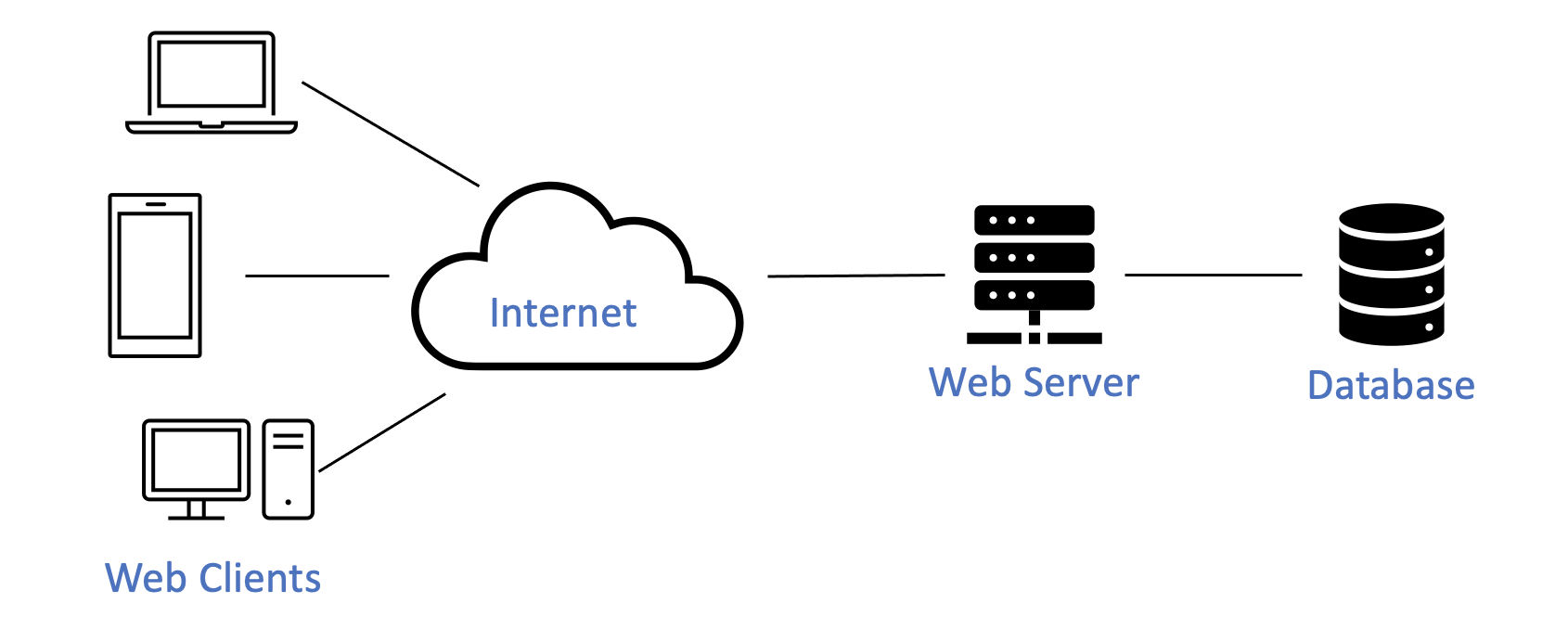
Different users send different requests to the Web Server. The Web Server queries the database and serves the requests with query results. A Web App displays the requested information in a readable manner. It not only displays the data but also facilitates users to manipulate the data.
HTML, CSS, and JavaScript are basic technologies used for the development of Web Apps. More powerful frameworks are built upon them to facilitate such developments.
HTML
HTML stands for the HyperText Markup Language. HTML is the standard markup language for documents designed to be displayed in a Web browser. A HTML page consists of a series of HTML elements. These elements are in the form of HTML tags. There are many HTML elements that can be used for different purposes in a HTML page.
To display a paragraph in a HTML page, we use the paragraph tag as follows:
<p> This is a paragraph </p>
To display a form, we use the following HTML elements:
<form>
    <label for="value">Value: </label>
    <input type="number" id="value" name="value"><br />
    <input type="submit" value="Submit">
</form>
There are two main parts to a HTML document: Head <head> and Body <body>.
We include meta-level information in the Header portion of the HTML page.
Other components which will be displayed in the browser are placed in the Body portion.
We build a HTML page using a simple text editor and name it using the .html extension.
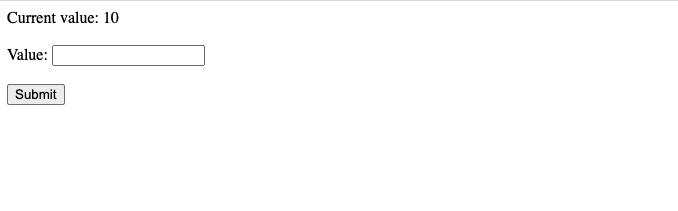
The following HTML page code snippet displays 10 as a current value and a form with an input field and a submit button on the browser:
<head>
    <title> HTML page </title>
</head>
<body>
    <form>
        <label>Current value: </label>
        <span id="currentValue" name="currentValue"> 10 </span> <br />
        <label for="value">Value: </label>
        <input type="number" id="value" name="value"><br />
        <input type="submit" value="Submit">
    </form>
</body>
We name this HTML file index.html and save it in the computer’s folder.
Subsequently, we open this file with a Google Chrome browser (use the Open with option).
The following image shows what is displayed on the Google Chrome browser:
CSS
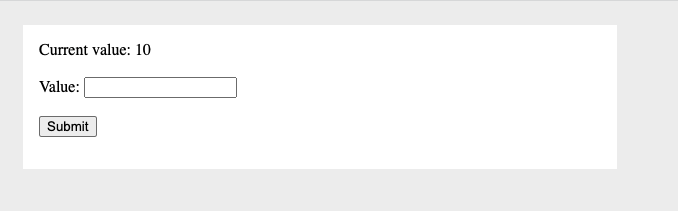
CSS stands for Cascading Style Sheets. We add styles to a HTML page using CSS to beautify the display of the page. We add styles using either an external CSS file, an internal CSS, or inline CSS. The following code snippet shows how we add inline css to a HTML page:
<head>
    <title> HTML page </title>
</head>
<body style="background-color: #efefef; padding: 16px;">
    <div style="width: 30%; background-color: white; padding: 16px">
        <form>
            <label>Current value: </label>
            <span id="currentValue" name="currentValue"> 10 </span> <br />
            <label for="value">Value: </label>
            <input type="number" id="value" name="value"><br />
            <input type="submit" value="Submit" >
        </form>
    </div>
</body>
The new look of the HTML page:
CSS Framework
CSS Frameworks consist of several CSS files that are ready-for-use by developers. These frameworks help developers design Web pages with respect to layouts, fonts, buttons, forms, navbars, etc. It helps to maintain consistency of HTML components throughout the Web Application.
We use Ant Design, an enterprise-level UI design framework with React UI library with a set of high quality React Components.
JavaScript
JavaScript is a scripting or programming language that allows one to implement complex features on a dynamic HTML page.
The following code snippet shows how one uses JavaScript in our index.html file to
alert the user of the submitted value from the form and set it is as the current value:
<head>
    <title> HTML page </title>
    <script>
        function submitFunction() {
            document.getElementById("currentValue").innerHTML = document.getElementById("value").value
            alert(document.getElementById("value").value)
        }
    </script>
</head>
<body style="background-color: #efefef; padding: 16px;">

    <div style="width: 30%; background-color: white; padding: 16px">
        <form onsubmit="submitFunction()">
            <label>Current value: </label>
            <span id="currentValue" name="currentValue"> 10 </span> <br />
            <br />
            <label for="value">Value: </label>
            <input type="number" id="value" name="value"><br />
            <br />
            <input type="submit" value="Submit">
        </form>
    </div>
</body>
Unfortunately, you will not able to see the updated current value after submitting the form. We will see how to show the current value later.
We can use JavaScript in an internal or external manner.
In the internal manner, we use JavaScript functions inside the <script> tags within a HTML page.
In the external manner, we write JavaScript functions as a separate JavaScript file (with .js extension) and import it into the HTML page using the <script> tag.
In the following example, a pop-up window is created using an internal JavaScript function showing the submitted value from the form:

JavaScript is what gives rise to user interaction in a web page. Due to this interaction, the web page is dynamic; its content is updated each time the user interacts with the page. Without JavaScript, a website will still be functional, but in a limited way.
With JavaScript, we are able to write Single Page Applications.
Single Page Application
A single-page application (SPA) is a Web Application that interacts with the user by dynamically rewriting the current web page with new data from the Web Server, instead of the default method of a web browser re-loading an entire page all the time.
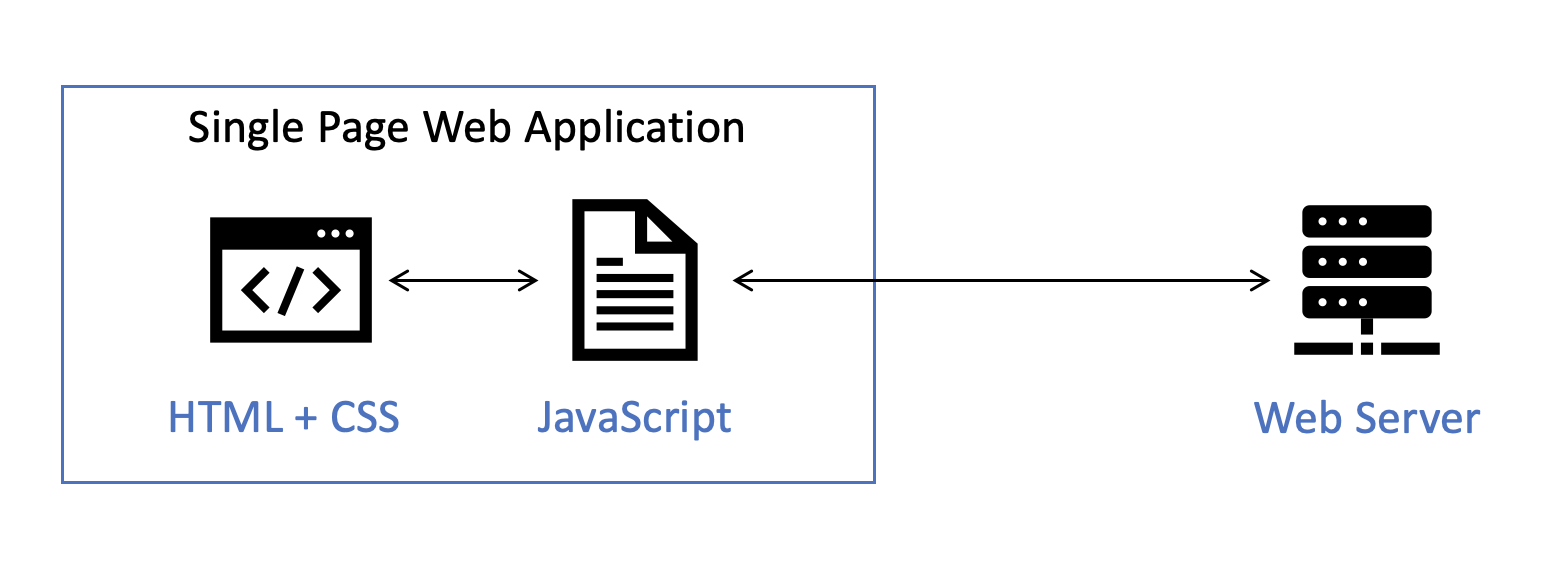
In the previous example, we notice that after we submit the form, the page is re-loaded. As a result, we will never get to see the updated value on the page.
The good thing about JavaScript is that there are lots of JavaScript libraries developed by other people and shared with the world to fulfill the different requirements of a Web Application. Most of the time, you just need to find and re-use what others have developed.
We make use of these libraries by importing them into our HTML code.
In this project, we explore how a Decentralized Application (DApp) is developed.
Our Web Application is connected to a blockchain network, instead of a Web Server.
We achieve this by using either the Web3 or EtherJS JavaScript library.
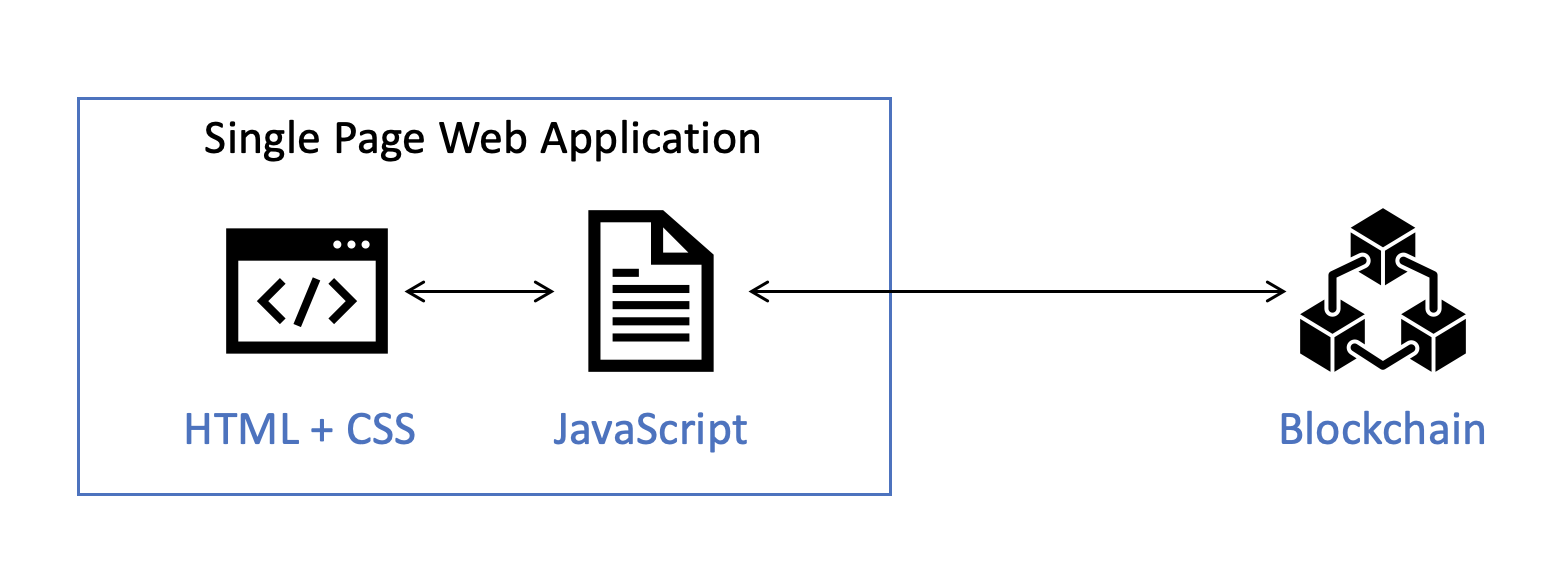
JavaScript is a powerful programing language. Several JavaScript frameworks such as Angular and React are available for developers to write Single Page Web applications. Developers only need to focus on business logic and UI features, rather than spending time on navigation and complex JavaScript functions for rendering HTML components.
React js
As described in the official site React is a JavaScript library for building user interfaces. A React component is a major concept developed in React. It handles the lifecycle of a UI component appearing in a web page and its demise from a page. These React components maintain states of existence. The UI on a page is updated whenever there are changes to a component’s state. A component is mounted or dismounted according to user’s interactions.
You can find more about React components on React Components. Every React component returns HTML code that will be displayed (rendered) on the browser.
App.js
There is a index.html page in the ./public directory of a React application.
index.html contains a div HTML element and its id is root.
When React renders a Web App, it starts the rendering from index.js, located inside the ./src directory.
index.js renders the App component into the root div of the index.html.
The App component is defined in App.js, placed inside the ./src directory.
App.js is where we start to write our Web App functionalities.
simple-storage-dapp
|--client
|  |--public
|  |  |--index.html
|  |--src
|  |  |--App.js
|  |  |--index.js
You can see how we build the App component in the next section.
Note
HTML, CSS, JavaScript programming, React, etc. are established bodies of knowledge. Learning each of them requires one to go through one or more courses. Clearly, we are unable to do this in this blockchain course. Our objective here is to illustrate their use in building a decentralized app using minimal code.